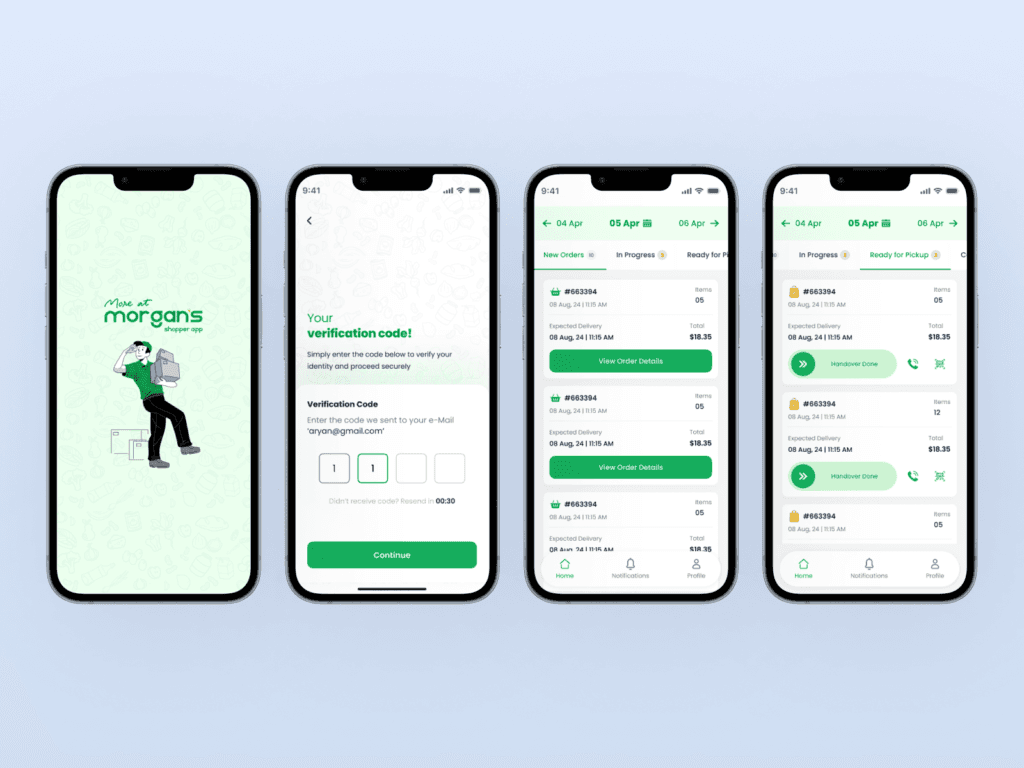
Morgan's Shopper App
Morgan's Shopper App
Overview
Building B2B mobile app, for in-store users to track and handle orders.
The Shopper App is designed to simplify and enhance the in-store and online shopping experience. It allows users to browse, scan, and track orders seamlessly, providing a clean, modern, and intuitive interface.
This case study highlights the design process, from login and account setup to order tracking and completion, ensuring a smooth, user-centered experience at every step.
Building B2B mobile app, for in-store users to track and handle orders.
The Shopper App is designed to simplify and enhance the in-store and online shopping experience. It allows users to browse, scan, and track orders seamlessly, providing a clean, modern, and intuitive interface.
This case study highlights the design process, from login and account setup to order tracking and completion, ensuring a smooth, user-centered experience at every step.
Categories
B2B | Figma
Mobile Application
Date
April 20, 2024
Client
More at Morgan's
Objective
Objective
Accept and manage customer orders easily.
View detailed order information and item lists.
Confirm product pickups and mark orders as completed.
Navigate between tasks (scanning, confirming, updating statuses) effortlessly.
Handle exceptions through clear error messages and confirmations.
Design Process
Design Process
1. Research & Discovery
We started by mapping out the shopper’s journey — from receiving an order notification to completing delivery.
Through user interviews and field observations, we identified the following needs:
Clarity: Shoppers needed a quick way to view assigned orders and status.
Efficiency: Minimizing steps between accepting and confirming items.
Accountability: Real-time confirmations for accuracy and transparency.
2. User Flow Definition
The experience was divided into key operational stages:
Login & Authentication – Secure access to personal and order data.
Order Management – View, accept, and process assigned orders.
Order Details & Scanning – Check off items, scan barcodes, and verify completion.
Delivery Confirmation – Mark order as completed and sync with customer’s app.
Error Handling – Inform the shopper of any scanning or product issues clearly.
1. Research & Discovery
We started by mapping out the shopper’s journey — from receiving an order notification to completing delivery.
Through user interviews and field observations, we identified the following needs:
Clarity: Shoppers needed a quick way to view assigned orders and status.
Efficiency: Minimizing steps between accepting and confirming items.
Accountability: Real-time confirmations for accuracy and transparency.
2. User Flow Definition
The experience was divided into key operational stages:
Login & Authentication – Secure access to personal and order data.
Order Management – View, accept, and process assigned orders.
Order Details & Scanning – Check off items, scan barcodes, and verify completion.
Delivery Confirmation – Mark order as completed and sync with customer’s app.
Error Handling – Inform the shopper of any scanning or product issues clearly.
Process
Process
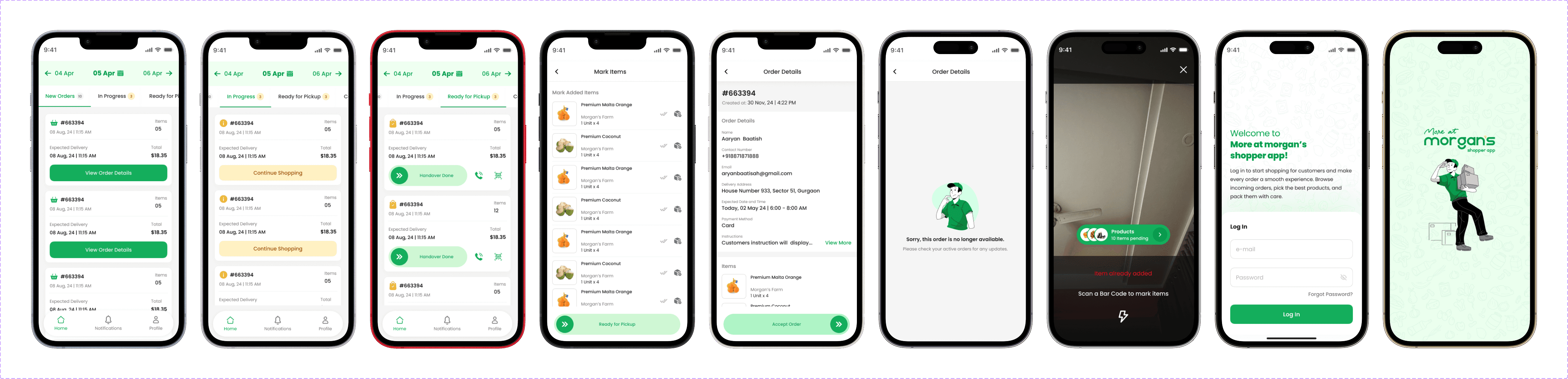
Login, Forgot Password & Reset Password
A seamless onboarding experience with clear CTAs and validation messages ensures users can securely access their accounts with minimal friction.
Home Screen
Displays an overview of active orders, recent activity, and a scan feature for in-store interactions.
Clean layout for quick scanning.
Visual hierarchy prioritizing active orders and scanning action.
Order Details
Users can view order progress, delivery status, and itemized lists.
Progress indicators to build trust and clarity.
Quick-access options for support and feedback.
Order Details – Completed
Provides confirmation and order summary after successful delivery.
Reinforces a sense of completion.
Allows users to reorder or share feedback easily.
Account Details
Minimalist interface focusing on essential profile actions such as contact info and app settings.
Error Messages
Clear and empathetic error handling screens ensure users always know what went wrong and how to fix it — reducing frustration and improving trust.
Login, Forgot Password & Reset Password
A seamless onboarding experience with clear CTAs and validation messages ensures users can securely access their accounts with minimal friction.
Home Screen
Displays an overview of active orders, recent activity, and a scan feature for in-store interactions.
Clean layout for quick scanning.
Visual hierarchy prioritizing active orders and scanning action.
Order Details
Users can view order progress, delivery status, and itemized lists.
Progress indicators to build trust and clarity.
Quick-access options for support and feedback.
Order Details – Completed
Provides confirmation and order summary after successful delivery.
Reinforces a sense of completion.
Allows users to reorder or share feedback easily.
Account Details
Minimalist interface focusing on essential profile actions such as contact info and app settings.
Error Messages
Clear and empathetic error handling screens ensure users always know what went wrong and how to fix it — reducing frustration and improving trust.
Outcome
Outcome
The resulting Shopper App delivers a frictionless user experience through:
Streamlined navigation.
Clear order visibility.
Thoughtful microinteractions and confirmations.
Early user testing showed a 25% decrease in user confusion during order tracking and higher engagement with in-app scanning features.
The resulting Shopper App delivers a frictionless user experience through:
Streamlined navigation.
Clear order visibility.
Thoughtful microinteractions and confirmations.
Early user testing showed a 25% decrease in user confusion during order tracking and higher engagement with in-app scanning features.
Conclusion
Conclusion
The Shopper App bridges the gap between in-store and online shopping by prioritizing clarity, speed, and trust. Every interaction was designed with the end user in mind, making shopping simpler, smarter, and more human.
Disclaimer: The projects shared are based on my personal experience and may have undergone changes since then.


Send an email, and I’ll take care of the rest
© 2026. All right reserved
Created by Abin Bernard
Send an email, and I’ll take care of the rest
© 2026. All right reserved
Created by Abin Bernard
Send an email, and I’ll take care of the rest
© 2026. All right reserved
Created by Abin Bernard